Substitutional Point Defects in Graphene (Band Structure)
Introduction.
This tutorial demonstrates the calculation of the band structure for graphene with vacancy and N substitutions, reproducing results from the following manuscript:
Manuscript
Yoshitaka Fujimoto and Susumu Saito, "Formation, stabilities, and electronic properties of nitrogen defects in graphene", Physical Review B, 2011. DOI: 10.1103/PhysRevB.84.245446. 1
This tutorial builds upon the Substitutional Point Defects in Graphene tutorial, where we created the N-doped graphene structure. Here, we calculate its electronic band structure using Quantum ESPRESSO and compare with the published results.
The figure below shows the band structure and atomic structure of N-doped graphene from the manuscript (Figure 3a):
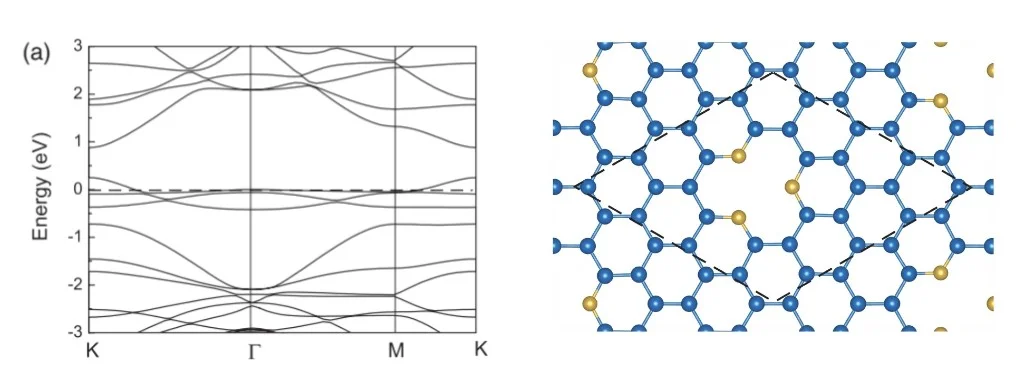
The calculation uses density functional theory (DFT) with the local density approximation (LDA) and norm-conserving pseudopotentials, following the methodology described in the manuscript.
Prerequisites.
Before starting this tutorial, you should:
- Complete the Substitutional Point Defects in Graphene tutorial to create the N-doped graphene structure, OR
- Have the N-doped graphene material file saved in the
uploadsfolder
Workflow Overview.
The band structure calculation workflow consists of the following steps:
- Set up the environment and parameters: Configure material, workflow, and computational settings
- Authenticate and initialize API client: Connect to the platform
- Load material: Import the N-doped graphene structure from file or Standata
- Create workflow: Set up the band structure calculation workflow with optional relaxation
- Configure compute resources: Select cluster, queue, and processor settings
- Create and submit job: Assemble and run the calculation
- Monitor job status: Wait for completion
- Retrieve and visualize results: Display the calculated band structure
Calculation Parameters.
Run Profiles.
The notebook supports two run profiles:
- Debug mode: Quick validation run with minimal k-point sampling and no relaxation. Completes in a few minutes.
- Production mode: Paper-quality settings with structural relaxation and dense k-point sampling, following Fujimoto & Saito (2011).
DFT Parameters.
The calculation uses the following DFT parameters (consistent with the manuscript):
- Functional: LDA (Perdew-Zunger parametrization)
- Pseudopotentials: Norm-conserving (ONCV)
- Energy cutoff: 50 Ry for wavefunctions, 200 Ry for density
- K-point grid (production): 6×6×1 for SCF and relaxation
- K-path: K → Γ → M → K (high-symmetry path in hexagonal Brillouin zone)
Relaxation Settings.
In production mode, the structure is relaxed before the band structure calculation to optimize atomic positions while maintaining the cell parameters.
Step-by-Step Instructions.
1. Open the Notebook.
Navigate to the API examples repository and open the band structure calculation notebook:
other/materials_designer/specific_examples/defect_point_substitution_graphene_simulation.ipynb
2. Configure Parameters.
In cell 1.2, set the run profile and material parameters:
# Switch between "debug" and "production" modes
RUN_PROFILE = "debug"  # Change to "production" for paper-quality results

# Material parameters
FOLDER = "./uploads"
MATERIAL_NAME = "N-doped Graphene"

# Workflow parameters
APPLICATION_NAME = "espresso"
MODEL_SUBTYPE = "lda"
For first-time use, start with "debug" mode to validate the workflow. Once confirmed working, switch to "production" for final results.
3. Set DFT Parameters.
The specific DFT parameters are configured in cell 1.3:
# Pseudopotential settings
PSEUDOPOTENTIAL_TYPE = "nc"
FUNCTIONAL = "pz"

# Energy cutoffs
ECUTWFC = 50
ECUTRHO = 4 * ECUTWFC

# K-point sampling and path (automatically set based on RUN_PROFILE)
4. Run the Notebook.
Execute all cells by selecting Run > Run All from the menu.
The notebook will:
- Authenticate with the platform and initialize the API client
- Load the N-doped graphene material
- Create and configure the band structure workflow
- Submit the calculation job
- Monitor the job status
- Display the results when complete
5. Monitor Progress.
The notebook includes automatic job monitoring with status updates. In debug mode, the calculation typically completes in 5-10 minutes. Production mode may take several hours depending on the cluster load.
6. Analyze Results.
Once the job completes, the band structure will be displayed automatically. The plot shows:
- Energy bands along the K → Γ → M → K path
- Fermi level position
- Band gap (if present)
- Comparison with pristine graphene (if available)
Expected Results.
The calculated band structure should show:
- Modified electronic structure near the Fermi level due to nitrogen substitution
- Breaking of symmetry compared to pristine graphene
- Localized states introduced by the nitrogen defects
- Band gap opening (depending on defect configuration)
Comparison with Published Results
The figure below compares the band structure from the Fujimoto & Saito manuscript (left) with our calculated results (right):
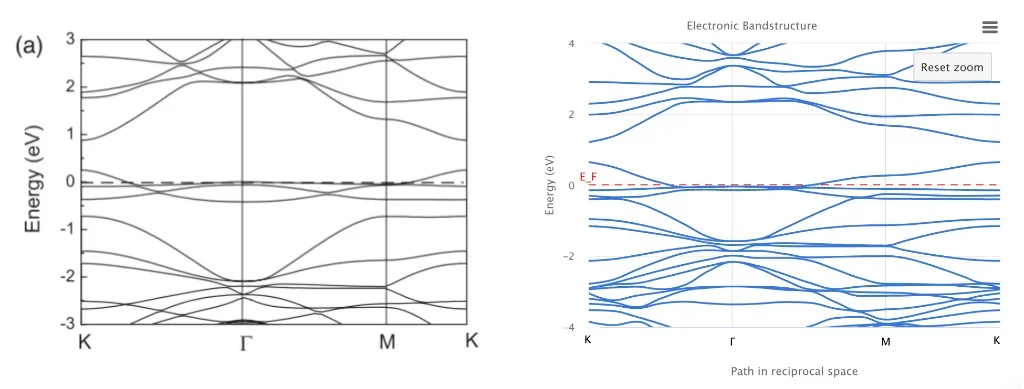
The calculated band structure reproduces the key features from the manuscript, including:
- The overall band dispersion along the K → Γ → M → K path
- The position of bands relative to the Fermi level
- The electronic structure modifications due to nitrogen substitution
- The characteristic features near the K and Γ points
Customization Options.
Modifying K-path.
To change the k-point path for band structure calculation, edit the KPATH parameter in cell 1.3:
KPATH = [
    {"point": "K", "steps": 20},
    {"point": "Г", "steps": 20},
    {"point": "M", "steps": 20},
    {"point": "K", "steps": 1},
]
Adjusting Computational Resources.
Modify the compute parameters in cell 1.2:
CLUSTER_NAME = "101"  # Your cluster name
QUEUE_NAME = QueueName.D  # Queue selection
PPN = 1  # Processors per node
Adding or Removing Relaxation.
Toggle structural relaxation by changing the ADD_RELAXATION flag (automatically set by RUN_PROFILE):
ADD_RELAXATION = True  # Enable relaxation
RELAXATION_KGRID = [6, 6, 1]  # K-point grid for relaxation
Troubleshooting.
Material Not Found.
If the material is not found in the uploads folder:
- Run the defect creation notebook first
- Ensure the material is saved with the exact name that is used ("N-doped Graphene")
- Check that the material file is in the correct
uploadsfolder
Interactive JupyterLite Notebook.
The following JupyterLite notebook demonstrates the complete workflow for calculating the band structure of N-doped graphene. Select "Run" > "Run All Cells".
References.
-
Yoshitaka Fujimoto and Susumu Saito. Formation, stabilities, and electronic properties of nitrogen defects in graphene. Phys. Rev. B, 84:245446, Dec 2011. URL: https://link.aps.org/doi/10.1103/PhysRevB.84.245446. ↩