Reciprocal Space Grid Convergence Study
This tutorial explains how to run a convergence study of the k-point grid size using Density Functional Theory (DFT).
K-point convergence can be run either as a stand-alone workflow or prepended as a Workflow Add-on to another property calculation.
The example system is crystalline silicon in its cubic-diamond crystal structure, using VASP as the simulation engine in the context of a Total Energy calculation.
VASP version
This tutorial applies to VASP versions 5.3.5, 5.4.4, and later.
1. Create the job
Silicon in its cubic-diamond crystal structure is the default material loaded on new job creation, unless the default was changed after account creation.
2. Select the workflow and add the convergence add-on
Workflows for calculating the Total Energy through VASP can be imported from the Workflows Bank into the account-owned collection. The workflow can then be selected and added to the job being created.
In order to add k-point convergence as an Add-on, click the appropriate button within the Subworkflow Editor and select "Convergence". The parameters in the resulting dialog can be set according to the instructions in this page. Accepting the default settings and clicking Apply is sufficient for this tutorial.
After insertion, scrolling down reveals the extra units added for convergence purposes, primarily of Logical type. These units progressively increase k-point density and check the total energy difference at each step.
3. Examine the input files
The main Execution Unit "vasp" can be opened by clicking it. The input files are visible towards the bottom of the unit editor.
Templating in KPOINTS
The KPOINTS file contains templating expressions (e.g. {{PARAMETER}}) required for workflow operation. This file should not be edited, or edited with caution.
4. Submit the job
Before submitting the job, review the Compute tab of Job Designer to verify the compute parameters. Silicon is a small structure, so 4 CPUs and a few minutes of runtime are sufficient.
5. Examine the results
Once the job completes, the Results tab of Job Viewer displays the final converged total energy and additional information about each execution unit.
6. Determine the converged k-point density
The output and input files are available under the Files tab of Job Viewer. The KPOINTS file can be downloaded and inspected to determine the k-point density at which convergence was reached.
6.1. View the convergence plot
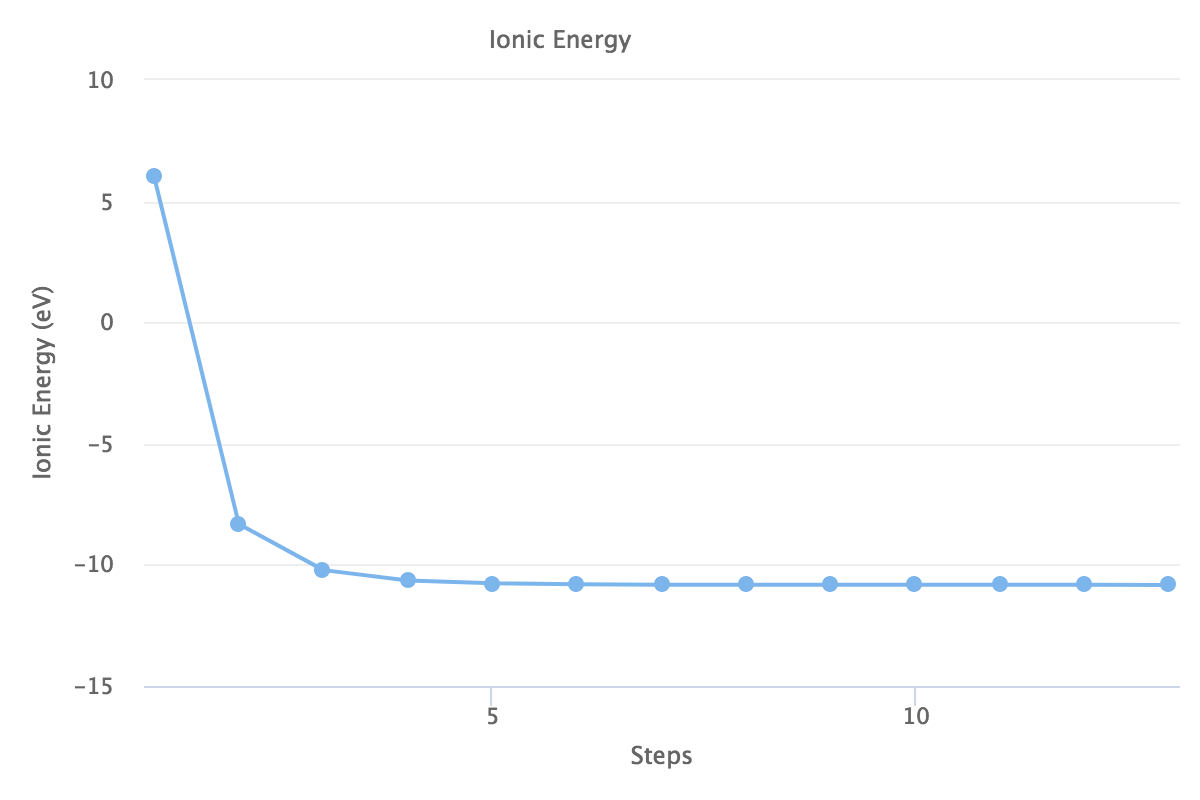
The convergence plot is available under the "Charts" tab of the main "vasp" Execution Unit. The relevant plot is labelled "Ionic Energy". For this plot to appear, the "convergence_ionic" option must be selected under the Detailed View tab of the Total Energy Subworkflow Editor at job design time.
An example convergence chart is shown below. After a sharp initial shift in energy, the desired convergence precision threshold is reached at a k-grid of 13 × 13 × 13.
7. Video walkthrough
The animation below demonstrates the creation and execution of a k-point convergence study using silicon and a Total Energy workflow.