GaAs/AlAs (110) Valence Band Offset
1. Introduction
This tutorial calculates the valence band offset ΔE_v of the GaAs/AlAs (110) interface, reproducing the result of the following manuscript:
Manuscript
Yoyo Hinuma, Andreas Grüneis, Georg Kresse and Fumiyasu Oba, "Band alignment of semiconductors from density-functional theory and many-body perturbation theory", Physical Review B 90, 155405 (2014). DOI: 10.1103/PhysRevB.90.155405. 1
This tutorial builds upon the GaAs/AlAs (110) Strained Superlattice tutorial, where the superlattice and the two strained bulk cells are created. Here, the platform's valence band offset workflow runs Quantum ESPRESSO on all three, and the offset is assembled as in the manuscript: each bulk's valence band maximum E_VBM is measured from its own average potential V̄, and the superlattice gives the step in V̄ between the two materials,
1 | |
The manuscript gives ΔE_v = 0.45 eV at the Perdew–Burke–Ernzerhof (PBE) level, GaAs above AlAs (Table II).
2. Prerequisites
Before starting this tutorial, one of the following steps should be completed:
- Follow the GaAs/AlAs (110) Strained Superlattice tutorial,
using the
interface_3d_3d_gallium_arsenide_aluminum_arsenide.ipynbnotebook embedded in its section 6, to create and saveGaAs/AlAs (110) superlattice 12+12,GaAs (110) bulk strainedandAlAs (110) bulk strained, OR - Have the three materials saved in the
uploadsfolder or in the account's materials collection
3. Workflow overview
The calculation consists of the following steps:
- Set up the environment and parameters: Configure the material names, the Density Functional Theory (DFT) model, and compute resources
- Authenticate and initialize API client: Connect to the platform
- Load materials: Import the superlattice and the two bulks, print their plane spacings
- Configure the model and k-grids: One DFT model, a k-grid per material from one k-point density
- Configure compute resources: Select the cluster, queue, and processor settings
- Configure the workflow: The model, a k-grid per material, and the band structures the valence band maxima are read from
- Run the job: One Valence Band Offset job, which runs a band structure and the electrostatic potential on each of the three materials
- Retrieve results: The valence band maxima and average potentials, the offset, and the potential across the superlattice
- Compare with the manuscript: Print the calculated values beside Hinuma et al.'s
4. Calculation parameters
| this tutorial | Hinuma et al. | |
|---|---|---|
| Code | Quantum ESPRESSO | VASP |
| Functional | PBE | PBE |
| Pseudopotentials | ultrasoft, Garrity–Bennett–Rabe–Vanderbilt (GBRV) library, Ga 3d in valence | projector augmented-wave (PAW) potentials, Ga 3d frozen in the core |
| Cutoff | 40 / 200 Ry | 550 eV for the bulks, not stated for the interface |
| k-points | 3.5 points per Å⁻¹: 6×4×1 for the 48-atom superlattice cell, 4×3×6 for the 8-atom (110) bulk cells | 6×4×1 for the interface cell, 6×6×6 for the bulk cells |
| Bulk lattice constant | 5.713 Å, the superlattice's, for both bulks | experimental, GaAs 5.654 Å and AlAs 5.661 Å, related to the interface lattice through the vacuum level (Eq. 2) |
| Cell | 12 + 12 planes, 48 atoms, a∥ = 5.713 Å, as built | 11 + 11 layers, out-of-plane lattice and positions relaxed |
| Reference potential V̄ | planar average of the electrostatic potential over one plane spacing at each block's centre | local Kohn–Sham potential averaged in the PAW spheres at the atomic sites, middle third of each region |
| Spin–orbit | not included | included, as a Heyd–Scuseria–Ernzerhof (HSE) correction to each valence band maximum |
5. Step-by-step instructions
5.1. Open the notebook
Navigate to the API examples repository and open the notebook:
1 | |
5.2. Configure parameters
Cells 1.2-1.4 set the material names, the compute resources, and the DFT model:
1 2 3 4 5 6 7 8 9 10 11 12 13 14 15 16 17 18 19 20 | |
5.3. Run the notebook
Execute all cells by selecting Run > Run All from the menu.
The notebook first authenticates with the platform, then runs the steps listed in section 3.
5.4. Analyze results
Section 8.1 of the notebook prints each bulk's valence band maximum, its average potential and its gap, and the average potential of the GaAs and the AlAs block in the superlattice:
1 2 3 4 | |
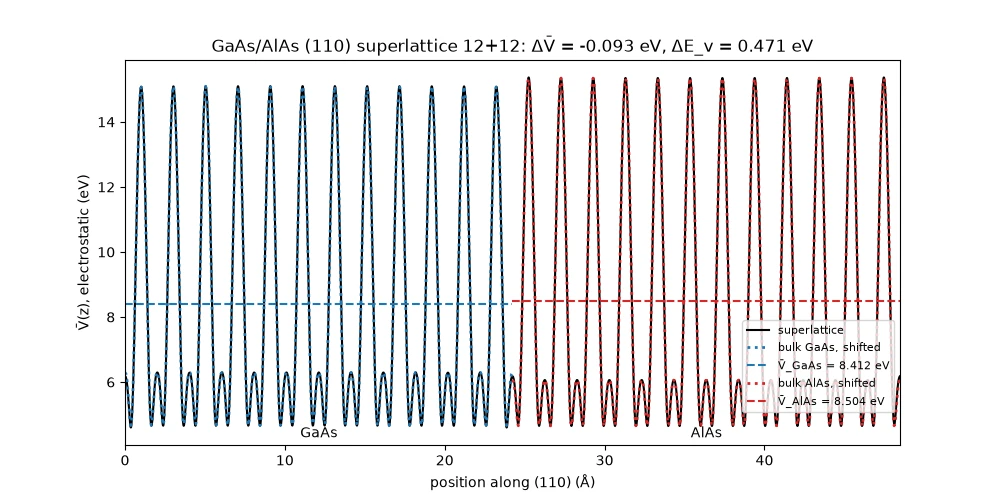
The valence band maximum is the top of band N_electrons / 2 along each bulk's k-path, and the gap the bottom of the next band minus it. Each block is averaged over one plane spacing, one period of the potential, at its centre, away from both interfaces. Section 8.3 plots the potential across the superlattice with the bulk potentials overlaid.
The last cell prints the offset beside the manuscript's values:
1 2 3 4 5 6 | |
6. Expected results
The manuscript's Table II lists ΔE_v = 0.45 eV for GaAs/AlAs at the PBE level, GaAs above AlAs, together with the HSE and GW values and the experimental values from 0.15 to 0.55 eV for this pair:
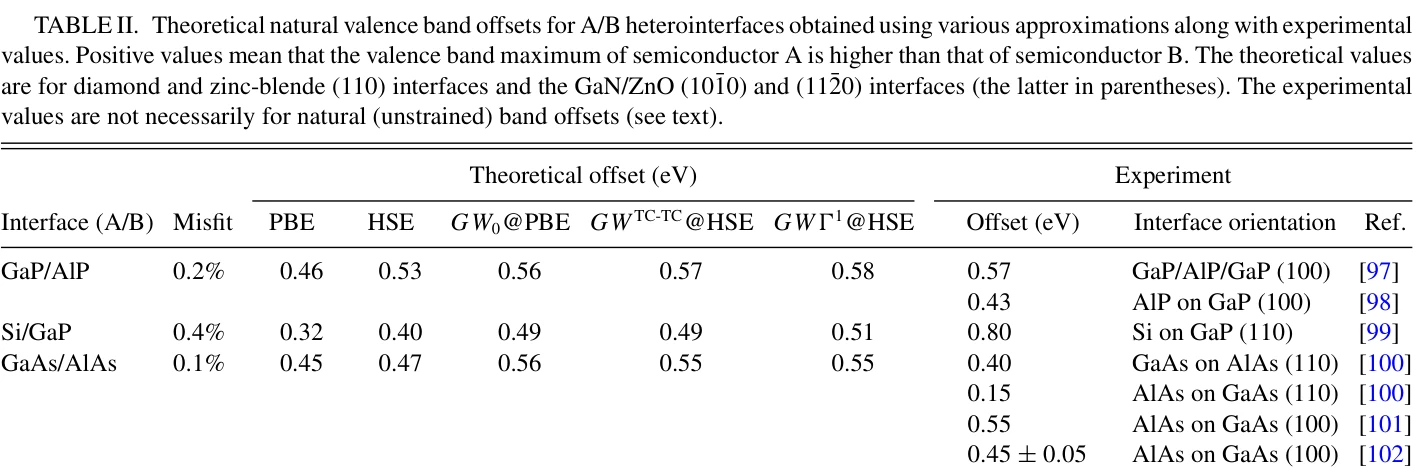
The manuscript's Table I lists the PBE bulk band gaps, 0.48 eV for GaAs and 1.32 eV for AlAs, at the experimental lattice constants (GaAs 5.654 Å, AlAs 5.661 Å). The bulk cells of this tutorial are at the mean of the two lattice constants of the platform's GaAs and AlAs structures, 5.713 Å.
6.1. Comparison with published results
| ΔE_v (eV) | GaAs gap (eV) | AlAs gap (eV) | |
|---|---|---|---|
| Hinuma et al. | 0.45 | 0.48 | 1.32 |
| This tutorial | 0.471 (+4.6 %) | 0.289 (−39.8 %) | 1.476 (+11.8 %) |
The offset splits into the bulk term (E_VBM − V̄)_GaAs − (E_VBM − V̄)_AlAs = +0.5635 eV and the lineup (V̄_GaAs − V̄_AlAs)_superlattice = −0.0928 eV. The manuscript does not list the two terms.
Section 8.3 of the notebook plots the electrostatic potential across one period of the superlattice, from the AlAs→GaAs interface: each bulk's own potential (dotted) shifted onto its block, and the two block averages (dashed). The bulk potentials coincide with the superlattice's inside both blocks and depart from it only at the interfaces:
7. Customization options
7.1. Adjust computational resources
CLUSTER_NAME selects the cluster by its full or partial name; a name that is not available makes the notebook
stop and list the ones that are.
8. Troubleshooting
8.1. Material not found
If one of the three names is not found, run the
GaAs/AlAs (110) Strained Superlattice tutorial first. In
JupyterLite, save the three materials to the account from Materials Designer under those exact names; in a local
Jupyter session, check that the uploads folder holds them.
8.2. No cluster available
If section 5.1 of the notebook prints an empty list of clusters, there is nothing to submit to. A cluster has to be available to the account before the notebook can run.
9. Interactive JupyterLite notebook
The following JupyterLite notebook calculates the valence band offset. Select Run > Run All Cells.
10. References
-
Yoyo Hinuma, Andreas Grüneis, Georg Kresse, and Fumiyasu Oba. Band alignment of semiconductors from density-functional theory and many-body perturbation theory. Physical Review B, 90:155405, 2014. URL: https://link.aps.org/doi/10.1103/PhysRevB.90.155405. ↩