Si/Ge (001) Strained Superlattice
1. Introduction
This tutorial creates the Si/Ge (001) superlattice of the following manuscript, together with the two strained bulk cells its valence band offset is computed from.
Manuscript
Chris G. Van de Walle and Richard M. Martin, "Theoretical calculations of heterojunction discontinuities in the Si/Ge system", Physical Review B 34, 5621 (1986). DOI: 10.1103/PhysRevB.34.5621. 1
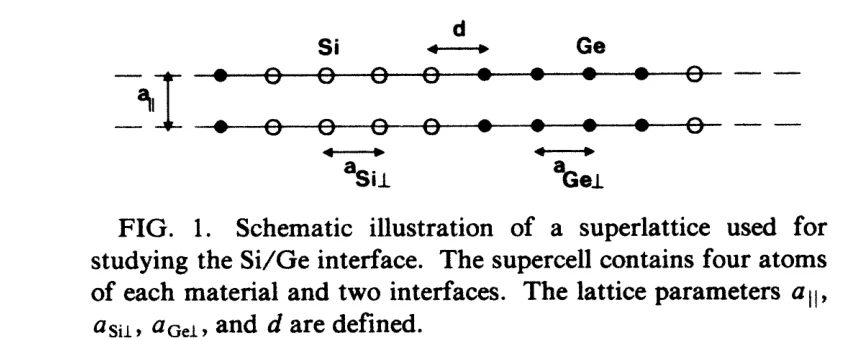
Germanium grown pseudomorphically on silicon (001) takes silicon's in-plane lattice constant, 5.43 Å, and expands out of plane to 5.82 Å; silicon stays cubic (Table I of the manuscript). The superlattice has four Si and four Ge (001) planes, one atom per plane, two identical interfaces and no vacuum: 8 atoms (Fig. 1). The spacing at each interface is the mean of the two bulk plane spacings, and the atoms stay at these ideal positions (Sec. II).
The figure below shows Fig. 1 of the manuscript, the superlattice and its lattice parameters:
The offset needs, besides the superlattice, separate bulk cells of cubic Si and of Ge strained as in the superlattice (Sec. III.A), so the notebook saves all three. The Si/Ge (001) Valence Band Offset tutorial loads them by name.
2. Open the notebook
2.1. Load the base materials
The notebook loads Si (mp-149) and Ge (mp-32) from Standata, so no input material needs to be selected.
2.2. Launch JupyterLite session
Select the "Advanced > JupyterLite Transformation" menu item to launch the JupyterLite environment, or use the notebook embedded in Section 6.
2.3. Open interface_3d_3d_silicon_germanium.ipynb notebook
Find and open interface_3d_3d_silicon_germanium.ipynb in the specific_examples folder.
3. Configure and create the structure
3.1. Set parameters
Cell 1.1 of the notebook sets the lattice constants, the number of layers, and the names of the saved materials:
1 2 3 4 5 6 7 8 9 10 11 12 | |
The three names are the ones the simulation notebook loads.
3.2. Run the notebook
Execute the notebook by selecting "Run" > "Run All Cells" from the JupyterLite menu.
3.3. Follow the construction
The notebook builds the superlattice in four steps:
- Each bulk is converted to its conventional cubic cell and strained to the lattice constants above. The two strained cells, with c along [001], are also the bulk references of the simulation.
- A slab of one conventional layer, four (001) planes, is cut from each, without vacuum.
- The Ge slab is placed on the Si slab at d = (a_Si⊥ + a_Ge⊥) / 8 = 1.406 Å, the mean of the two plane spacings. The second interface is the periodic one, at the top of the cell: setting c = a_Si⊥ + a_Ge⊥ = 11.25 Å gives it the same spacing.
- The cell is reduced to the primitive cell, 3.84 × 3.84 × 11.25 Å with 8 atoms.
4. Analyze the structure
Section 2.3 of the notebook prints the plane spacings along c of the three materials:
1 2 3 4 5 6 | |
Si planes are a_Si⊥ / 4 = 1.3575 Å apart, Ge planes a_Ge⊥ / 4 = 1.455 Å, and both interfaces 1.406 Å.
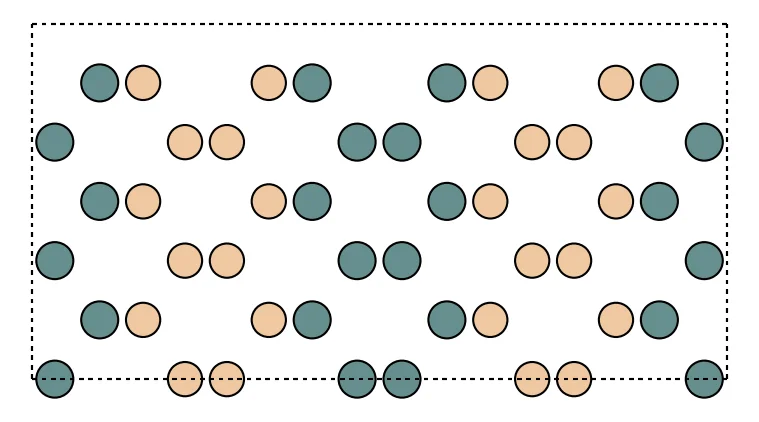
The superlattice built here, seen along [110] with [001] horizontal, two periods and three cells along b; Si is light, Ge dark:
5. Save the structure
Section 4 of the notebook passes the three materials to Materials Designer, where they can be saved on the
platform, and writes them to the uploads folder, from which the
simulation tutorial loads them.
6. Interactive JupyterLite notebook
The following JupyterLite notebook creates the superlattice and the two bulk cells. Select "Run" > "Run All Cells".
7. Parameter fine-tuning
The other (001) rows of Table I follow from the three lattice constants in cell 1.1, for example Si strained on a
Ge substrate with IN_PLANE_LATTICE_CONSTANT = 5.65, SUBSTRATE_OUT_OF_PLANE_LATTICE_CONSTANT = 5.26 and
FILM_OUT_OF_PLANE_LATTICE_CONSTANT = 5.65; change the three names with them. The manuscript's 6 + 6 size check
cannot be built this way, since the slab thickness counts conventional layers of four (001) planes.
8. References
-
Chris G. Van de Walle and Richard M. Martin. Theoretical calculations of heterojunction discontinuities in the Si/Ge system. Physical Review B, 34:5621–5634, 1986. URL: https://link.aps.org/doi/10.1103/PhysRevB.34.5621. ↩