Ferroelectric Switching of HfO₂ along the S:T Pathway
1. Introduction
This tutorial creates the initial and final structures of the S:T polarization reversal of orthorhombic Pca2₁ HfO₂ from the following manuscript:
Manuscript
Xinpeng Mu, Yao Wu, Binjian Zeng, Jie Jiang, Yichun Zhou, Lu Yin, Min Liao and Qiong Yang, "Polarization switching of HfO2 ferroelectric in bulk and electrode/ferroelectric/electrode heterostructure", npj Computational Materials 11, 126 (2025). DOI: 10.1038/s41524-025-01633-2. 1
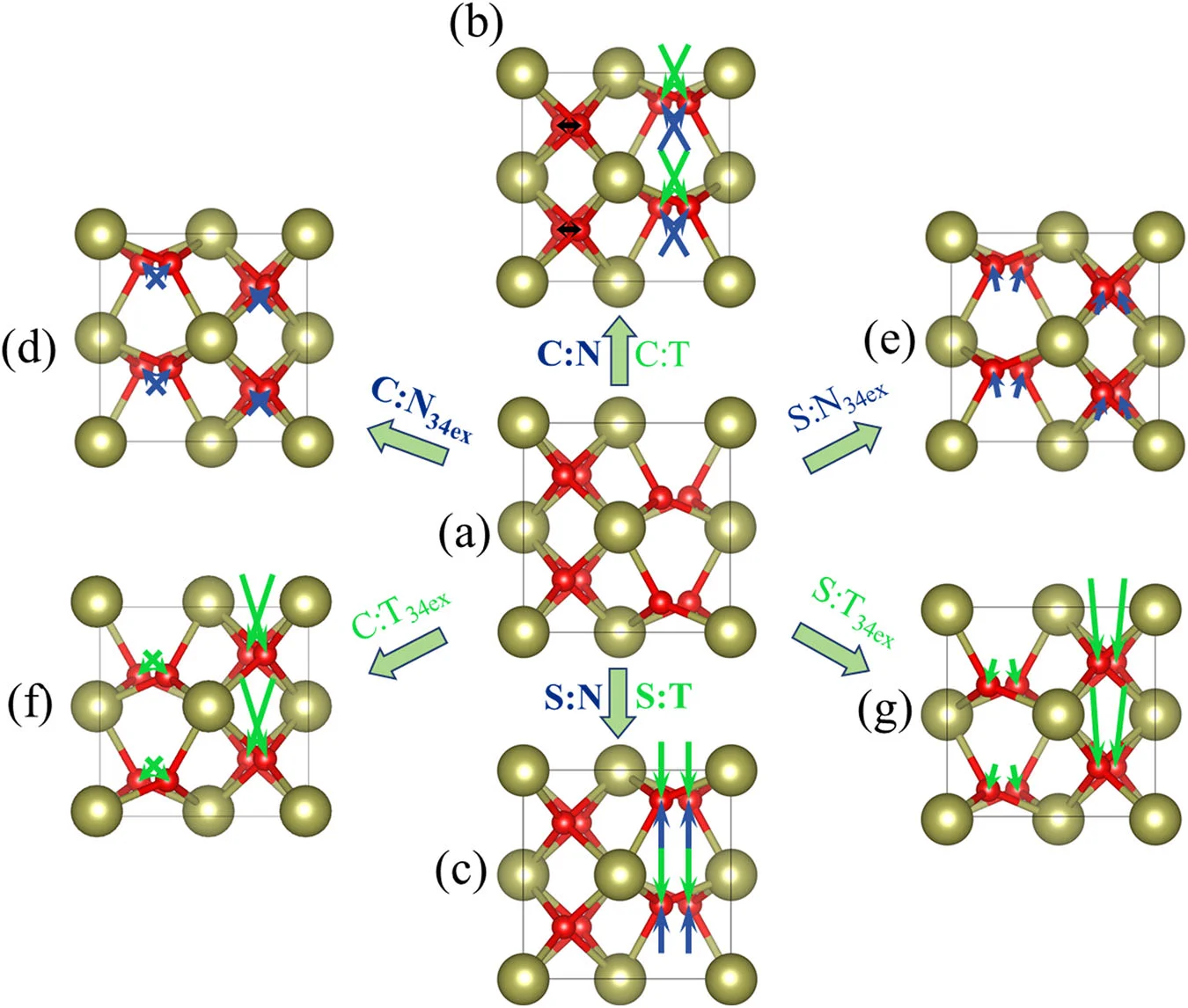
The manuscript names the pathways of the 180° polarization reversal by the way the three-fold coordinated O move (p. 2): "the three-fold coordinated O shifting through (denoted by T) or not through (denoted by N) Hf-atomic planes along the polarization (z-) direction leads to opposite polarization reversals. And as seen along the x-direction, the polarization reversal may be realized by the straight z-direction shifting of three-fold coordinated O (denoted by S) [...]".
Fig. 1 of the manuscript shows the unit cell, four Hf and eight O atoms, seen along x: the initial state (a) and the final states (b)–(g). The S:T pathway takes (a) to (c), along the green arrows of (c).
The energy barrier between the two structures is computed in the simulation tutorial.
2. Create the structures
2.1. Load the base material
The notebook loads Pca2₁ HfO₂ (mp-685097) from Standata by its full name, so no input material needs to be selected. The cell is oriented as in Fig. 1: a along x, the polar axis along z, the origin on a Hf atom. The lattice is used as stored in Standata, a = 5.2195 Å, b = 5.0048 Å, c = 5.0327 Å; the manuscript's own calculation gives a = 5.256 Å, b = 5.046 Å, c = 5.073 Å (Methods, p. 6).
2.2. Launch JupyterLite session
Select the "Advanced > JupyterLite Transformation" menu item to launch the JupyterLite environment, or use the notebook embedded in section 6.
2.3. Open perturbation_ferroelectric_switching_hafnium_dioxide.ipynb notebook
Find and open perturbation_ferroelectric_switching_hafnium_dioxide.ipynb in the specific_examples folder.
2.4. Set up the parameters
Cell 1.1 of the notebook sets the material, the atoms that move, and the names of the saved materials:
1 2 3 4 5 6 7 8 9 10 11 | |
2.5. Run the notebook
Run the notebook by selecting "Run" > "Run All Cells" from the menu.
3. Follow the construction
The notebook builds the final structure from the initial one in two steps.
3.1. Find the three-fold coordinated O
Section 2.1 of the notebook counts, for every O atom, the Hf atoms within NEIGHBOR_RADIUS, periodic images
included. Four O atoms have three Hf neighbors and four have four.
3.2. Shift them through the Hf plane
Section 2.2 moves the four three-fold coordinated O straight along z through the Hf plane below them, to the same distance on the other side. Each sits 0.694 Å (0.1378 c) above that plane, so each moves by 2 (z_Hf − z_O) = −1.387 Å. Their x and y coordinates and the order of the atoms are unchanged: atom i is the same atom in both structures, as the nudged elastic band of the simulation tutorial requires.
4. Compare with the manuscript
Section 3 of the notebook shows both structures in the Wave viewer. The figure below places Fig. 1(a) and (c) of the manuscript (left) beside the two structures built here, in Wave with bonds, seen along x (right):
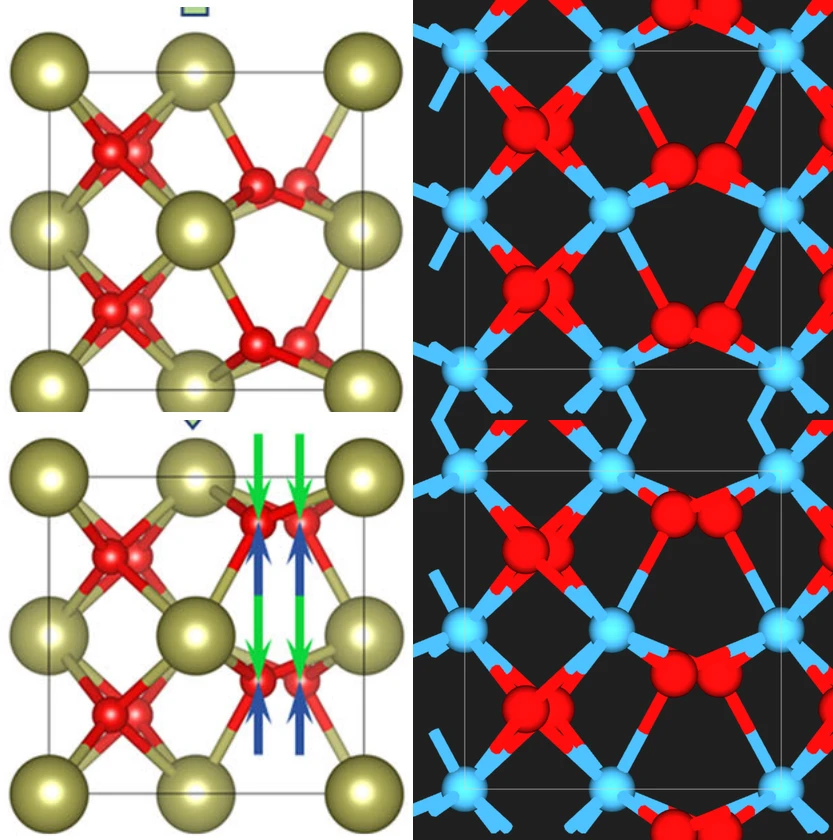
The Wave pictures are taken with bonds and the orthographic camera on, repetitions 1×2×2, radius 0.25, and the chemical connectivity factor 0.95.
5. Pass the materials to Materials Designer
Section 4 of the notebook passes two materials and writes them to the uploads folder: HfO2 Pca21 and
HfO2 Pca21 S:T switched.
6. Interactive JupyterLite notebook
The following JupyterLite notebook creates the two structures. Select "Run" > "Run All Cells".
7. References
-
Xinpeng Mu, Yao Wu, Binjian Zeng, Jie Jiang, Yichun Zhou, Lu Yin, Min Liao, and Qiong Yang. Polarization switching of HfO2 ferroelectric in bulk and electrode/ferroelectric/electrode heterostructure. npj Computational Materials, 11(1):126, 2025. URL: https://doi.org/10.1038/s41524-025-01633-2. ↩